See more than
today’s number.
Follow a direction through the ups and downs, instead of judging your progress from one weigh-in.
MORE THAN A WEIGHT LOG
Is your effort
moving you forward?
Turn your weigh-ins into a feedback loop. See your direction, notice when it changes, and decide when to adjust or stay the course.
Weight tracking for iPhone · Available now · No subscription
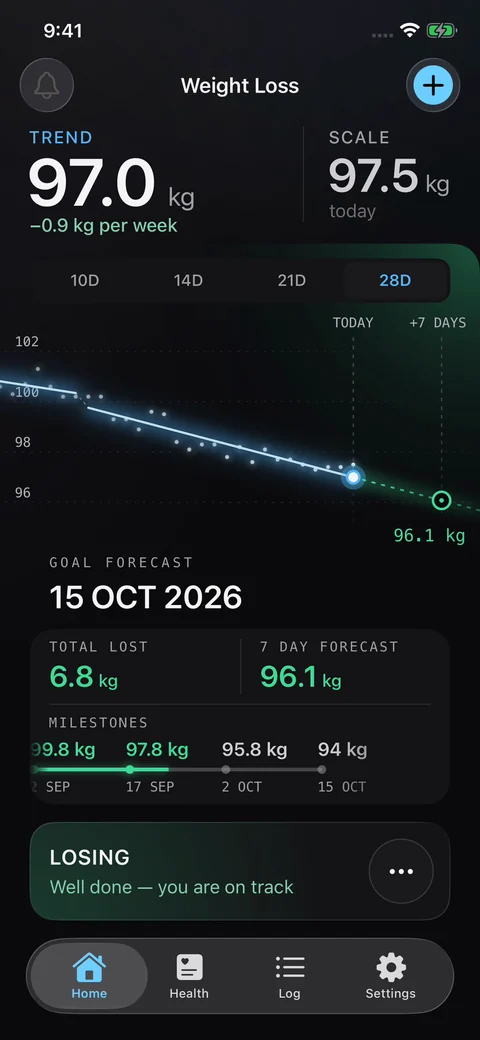
You change how you eat. You make time to move. Then the scale goes up—and you wonder whether any of it is working.
A single reading can’t answer that. A feedback loop can help: follow your routine, record your weight, see the pattern, then decide what to do next. True Progress shows whether your recorded weight is moving towards your goal and highlights when that direction may be changing.
Know when to review your routine.
And when to relax and keep going.
Follow a direction through the ups and downs, instead of judging your progress from one weigh-in.
A warning gives you something specific to review. You decide whether anything needs to change.
New weigh-ins update your trend and forecast. You get fresh feedback as you keep going, closing the loop.
START WITH WHAT MATTERS MOST
A higher weigh-in can sit within a falling trend. See both, so today’s number doesn’t have to define your week.
The app looks for stretches where your weight follows a similar direction. As a new pattern emerges, it can give that pattern its own trend. You can see the pace you’re following now, as well as the progress that came before.
Your current trend, early warning and goal forecast work together as a feedback loop. A falling trend can give you confidence to stay the course. A warning gives you a reason to review your routine, then watch how the next readings develop.
Use True Progress alongside the weight-loss programme you choose.
The trend estimates your direction from recorded weigh-ins. It doesn’t measure body fat or prove which part of your routine caused a change.
The simple explanation behind the lines ↗“To my knowledge, this combination of trend and change-detection statistics is unique among weight-loss apps.”
Paul Ude · Software engineer and creator of True Progress
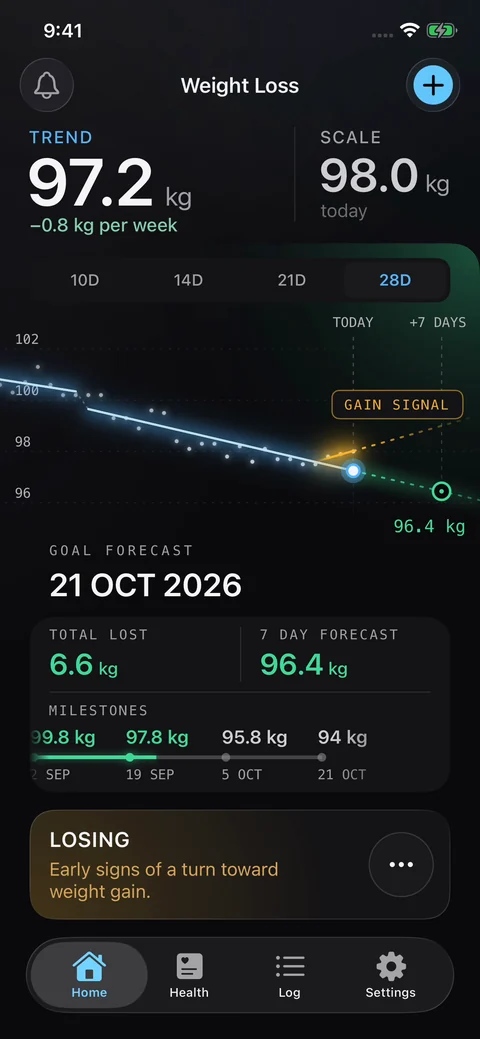
Your main trend may still be falling while recent readings start to tell a different story.
The warning line pays closer attention to those recent readings. It can highlight early signs of a turn before your main trend changes—giving you a reason to check in with your routine.
One unusual reading and a developing pattern ask different things of you. Keeping the main trend and early warning separate helps you see both. A warning is a prompt to review, not an instruction to eat less or exercise more.
“If this direction continues, when could I reach my goal?”
Your estimated goal date updates with your weigh-ins. Milestones break the journey into smaller achievements, while the seven-day forecast gives you a nearer point to look towards.
Progress isn’t always obvious from the scale. Seeing a milestone reached or a forecast move closer can give you another way to recognise your effort.
A forecast is an estimate based on your current trend, not a deadline or a promised result. It changes when your trend changes.
A new goal deserves a different view.
Switch from following a losing or gaining trend to watching your usual weight level. Set a range, see how long you’ve stayed inside it, and get a warning when a change may be developing.
Daily weight still moves around in maintenance. Flat sections of the chart show periods with a similar level; a step marks a detected shift. You can focus on staying within your range instead of chasing a lower number.
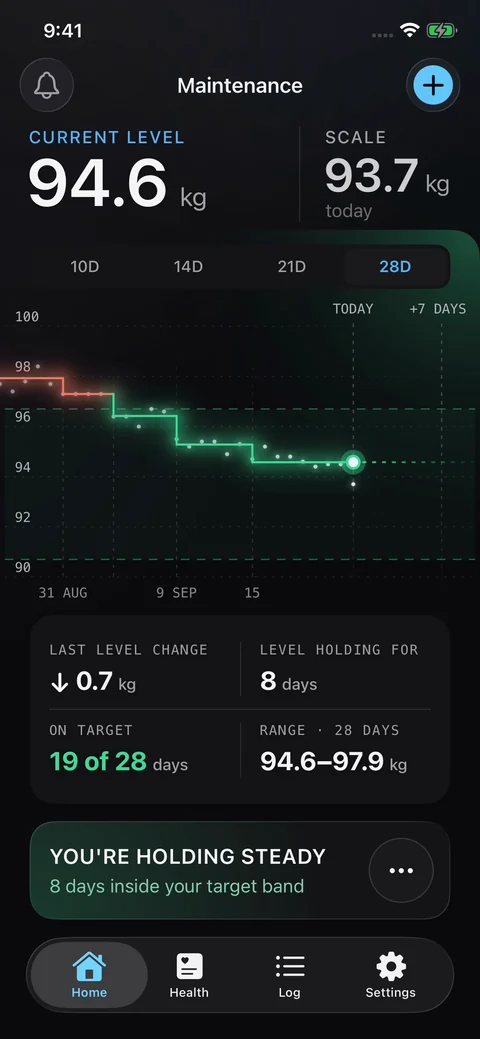
Two ways to understand your progress. Included with True Progress Plus or True Progress Pro, as a one-time purchase.
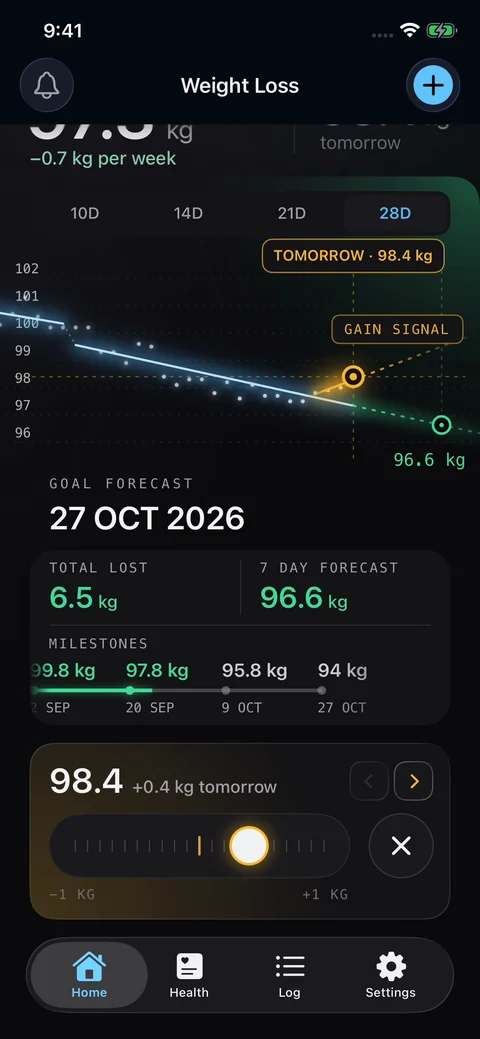
Move the weight slider to try a hypothetical future weigh-in. The chart shows how that number could affect your trend and forecast, without adding it to your real records.
The slider is set to 98.4 kg tomorrow. An amber gain signal appears while the main trend still slopes down. You can explore how much room there is before a warning appears.
Why it helps: put a possible higher weigh-in in perspective before it happens. It explores weight scenarios; it does not predict what a particular meal will do.
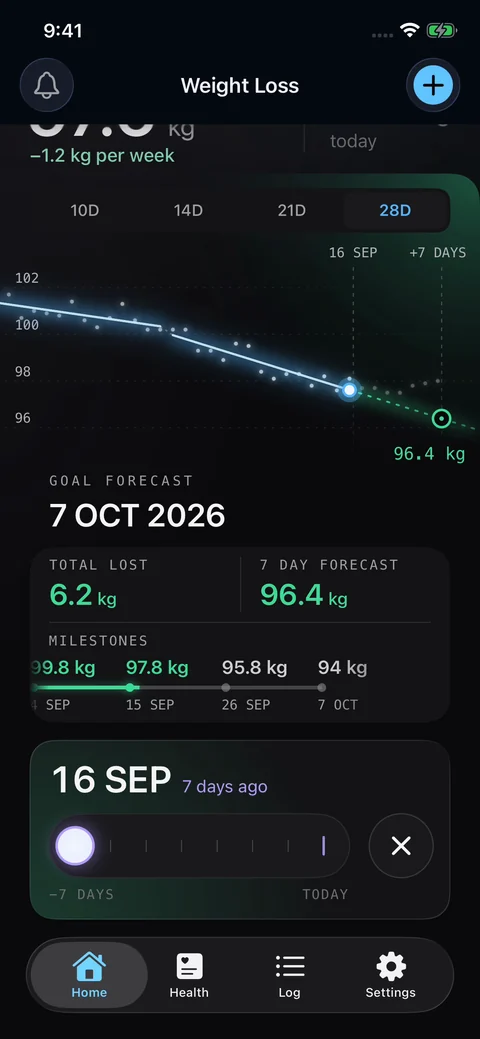
Move the time slider from seven days ago towards today. Revisit how your trend, warnings and goal forecast developed as your weigh-ins arrived.
The slider is at 16 September, seven days ago. The chart shows the downward trend and the goal forecast of 7 October as they appeared at that point in the replay.
Why it helps: notice progress you might have forgotten, and reflect on how you responded to a warning. You can review the week without relying on memory.
Your watch and devices collect the numbers. True Progress helps you see how your usual pattern is changing.
01 / INCLUDED IN STANDARD
Start with the dashboard. Each point is a recorded reading; the line brings recent readings together.
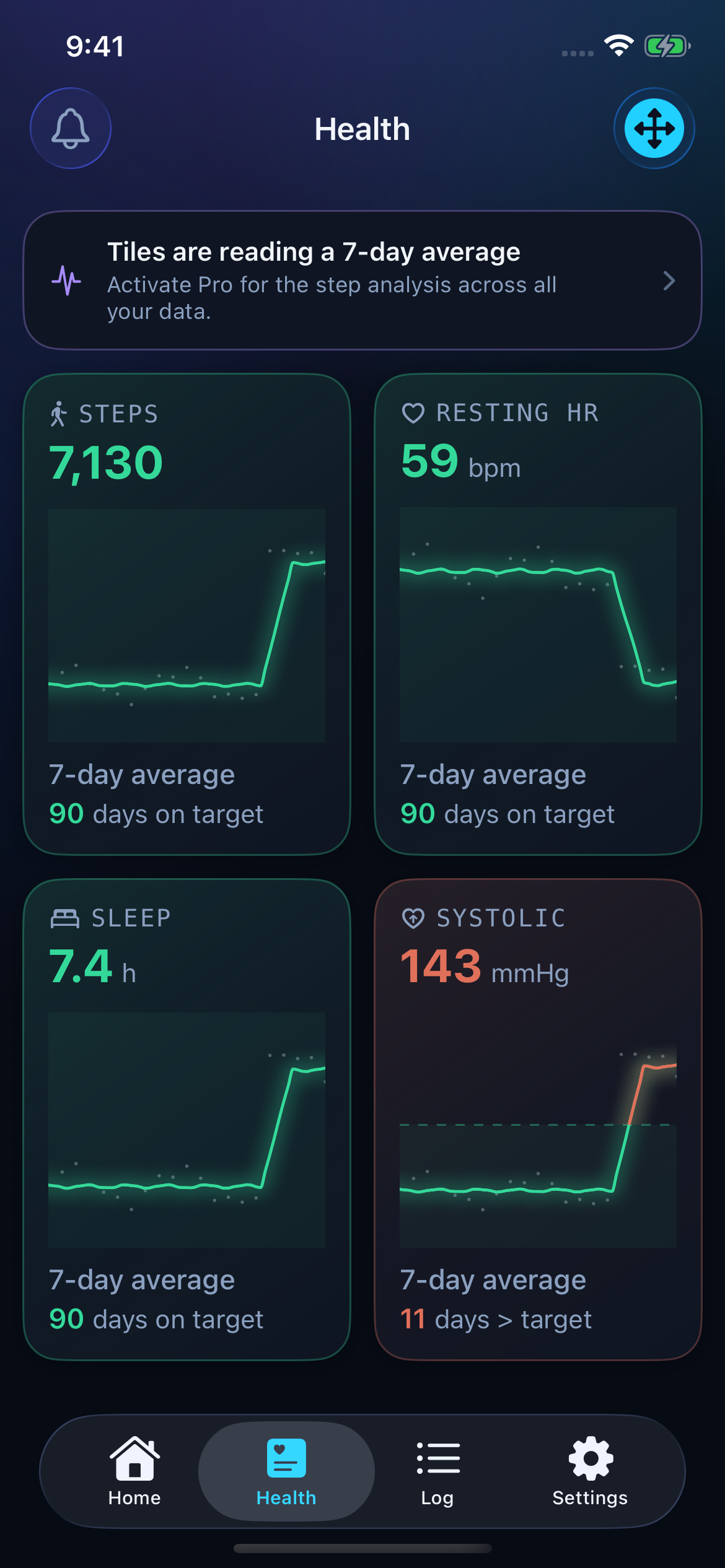
02 / TRUE PROGRESS PRO · ONE-TIME PURCHASE
Now look at this Pro steps example. The points still jump around. The flat sections show the usual levels detected among those readings.
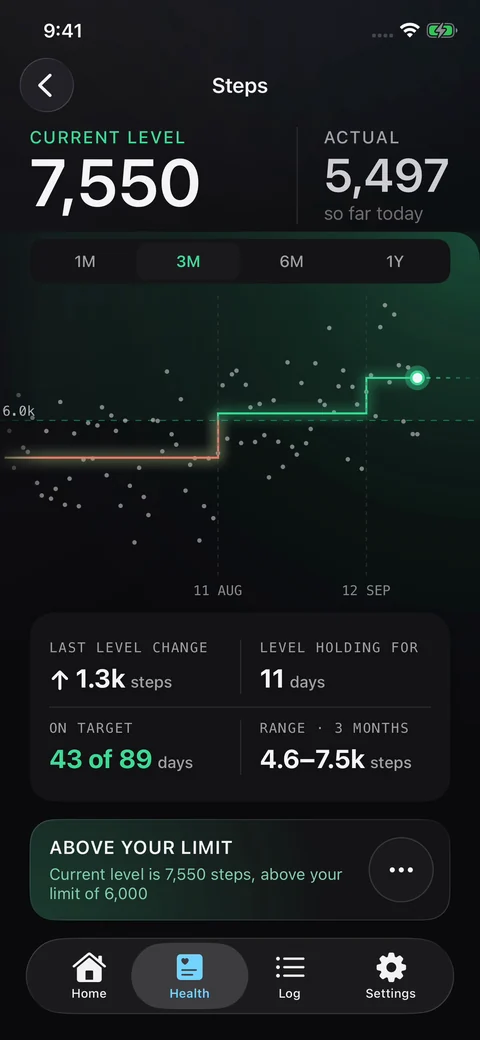
03 / TRUE PROGRESS PRO · ONE-TIME PURCHASE
This Pro dashboard puts the changes beside each other, so you can decide which chart deserves a closer look.
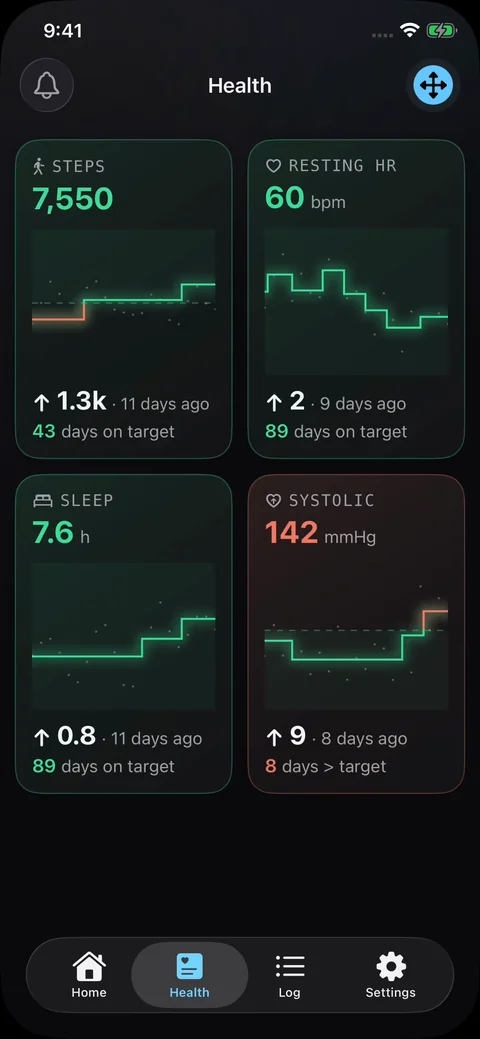
Missing readings still matter. True Progress cannot recover unrecorded activity or tell whether a change came from your health, your routine or your device. Review unexpected readings; don’t use a trend to dismiss a concerning blood-pressure result or change medication.
Available charts depend on the data in Apple Health and the permissions you allow. Weight tracking is included separately.
Why bring a history of readings? The American Heart Association explains how readings over time give a more complete picture. This is general guidance, not an endorsement of True Progress.
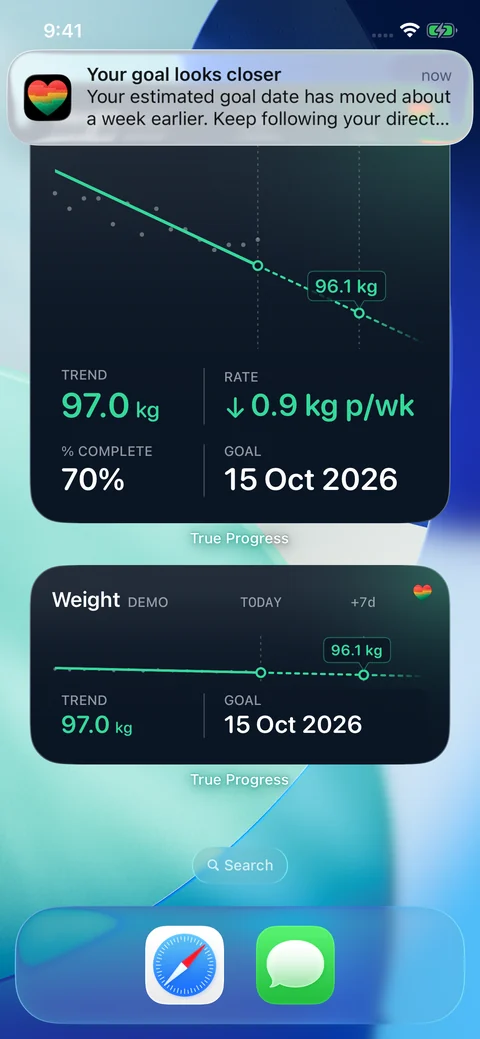
Your progress at a glance. A heads-up when there’s something to notice.
Put your weight and Health information on your Home Screen. Receive weight trend updates, milestone and forecast notifications, and alerts when your Health average crosses a chosen limit.
A widget puts the current picture where you already look. Notifications bring changes to you, so you can spend less time opening charts just to check.
Weight-loss and maintenance change analysis, alerts and widgets are included in Standard. True Progress Pro adds advanced change detection to imported Health data and its alerts and widget content.
A small moment of enjoyment in a useful routine.
The foot-shaped weight entry makes logging feel a little less like filling in a form. Add a reading by hand, or import weights recorded in Apple Health by compatible scales and apps.
Choose kilograms, pounds, or stones and pounds. Keep a readable history of your actual weigh-ins alongside your trend.
A clear result, a familiar routine and an interface you enjoy can make the next check-in feel more inviting. The point is to make useful feedback easy to return to.
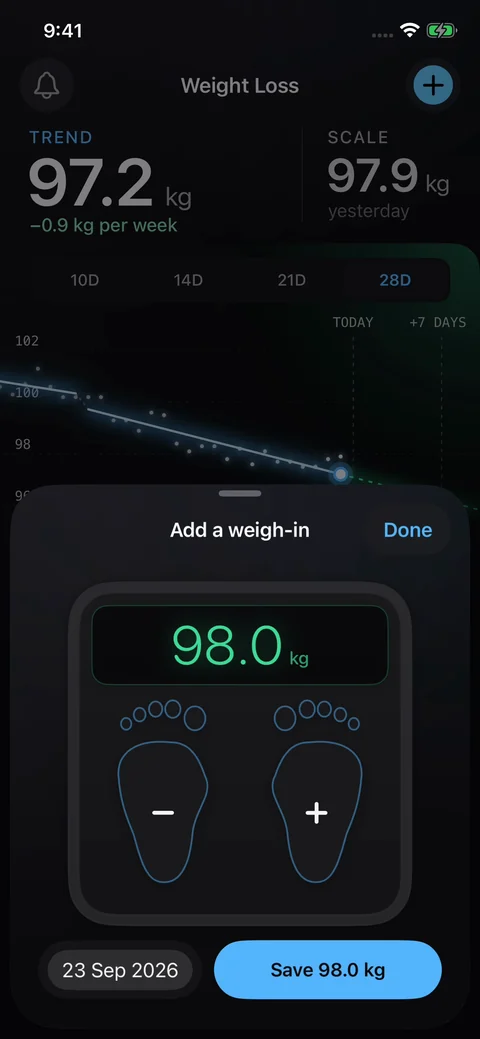
Light or dark. Calm or colourful. Choose a theme and a readable font you enjoy using.
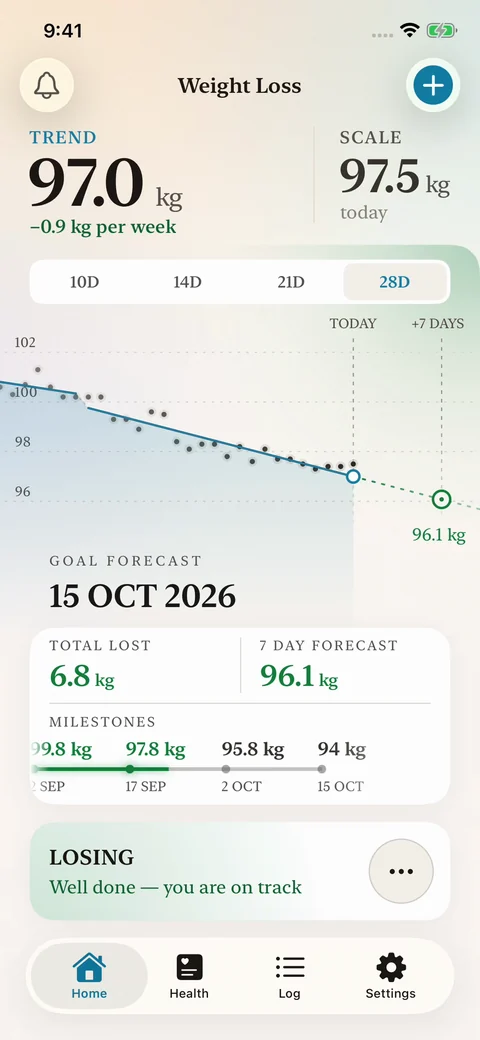
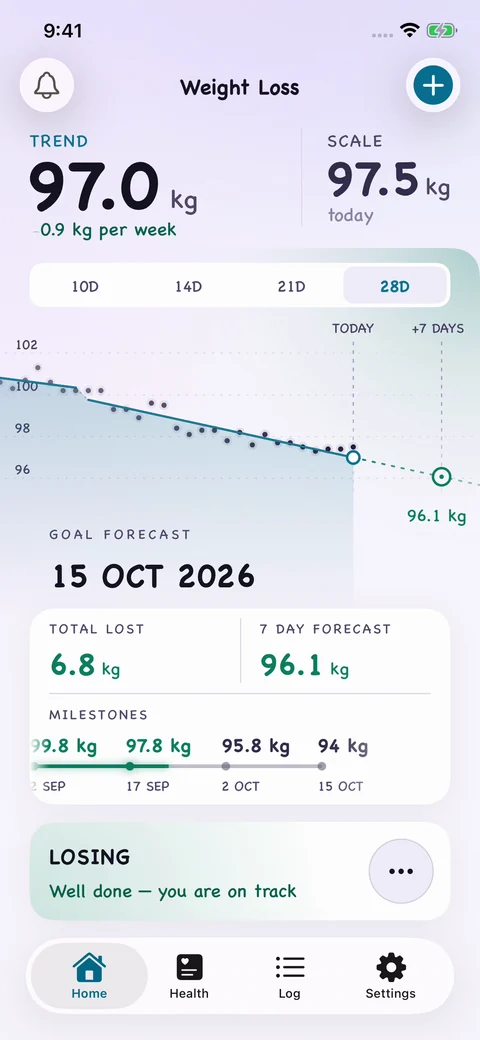
You don’t need an upgrade for weight-loss trends, early warnings, forecasts or maintenance. Start with Standard, then add the tools you find useful.
Try Pro and Plus for 14 days. Select the zero-cost “14 day Trial” one-time purchase in the app. It isn’t a subscription and you won’t be charged when it ends. Keep Standard afterwards, or choose a separate one-time upgrade.
My late father spent around 40 years working in statistics and quality control. His software helped identify meaningful changes in a manufacturing process.
I used that software during the Goodlife 12 Week Challenge. For me, it created a feedback loop: I could see when to step things up, and when to relax and keep doing what was working.
I went on to win the challenge and appeared on the cover of Australian Men’s Fitness. That experience inspired me to bring the same kind of feedback to an iPhone.
Paul Ude Software engineer and creator of True Progress
Read my story ↗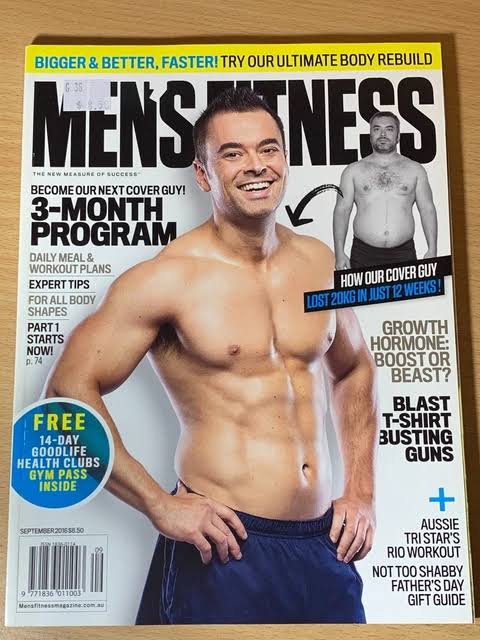

True Progress is an iPhone app for understanding your weight and changes in your recorded health data. It shows weight trends, early warnings, milestones, estimated goal dates and maintenance levels. It also analyses 17 types of data imported from Apple Health, using moving averages in Standard and advanced change detection with True Progress Pro.
A log stores individual weigh-ins. True Progress also looks for changes in their direction, so you can see whether your recorded weight is still moving towards your goal. A separate warning line can highlight a possible turn before the main trend changes.
No. Standard includes weight trends, early warnings, goal forecasts, maintenance change detection, Health moving averages, notifications and widgets. True Progress Plus and True Progress Pro are optional one-time purchases.
True Progress Pro adds advanced change detection to all your imported Apple Health data, with enhanced Health notifications and widget content. It includes the What If and Rewind tools from True Progress Plus. Weight-loss and maintenance change analysis are already included in Standard.
No. The optional 14 day Trial is a zero-cost, one-time purchase that lets you try Pro and Plus. It does not renew or charge automatically. When it ends, Standard remains available unless you choose a separate upgrade.
Yes. You can enter weights manually in kilograms, pounds, or stones and pounds. Apple Health import is optional; imported measurements depend on the data and permissions available.
No. It shows patterns in the readings you record or import. It cannot identify the cause of a change, recover readings a device missed, or diagnose a condition. A PDF health report helps you share the recorded history with a health professional.
Yes. Maintenance mode focuses on your usual weight level and a range you choose. It shows level changes and time within your range, with weight alerts and widgets included in Standard.
Tell us what would make True Progress more useful to you.
Ask about the app, request a translation or suggest a feature. Your message goes to the creator’s support inbox.
Prefer email? true.progress.app@gmail.com
Weight loss. Maintenance. Health in context.
No subscription. Optional one-time upgrades.